
The use of binary for telegraph codes (e.g. Morse and Baudot codes) began in 19th century
George Boole’s work on “The Laws of Thought” used True and False values which can be represented as 0 and 1.
Binary is now almost universally used in computers. There is some experimentation with ternary and other “multi- valued” logics which represent True, False and Maybe/Don’t know values. There is also fuzzy logic, where values are in a continuous spectrum, not discrete.
Why use binary? The main reasons are reliability and simplicity. Binary devices are easier to manufacture and have a greater tolerance for error. Binary devices are two-state on/off switches. Decimal devices are 10-state and have a smaller error for margin.
For example, consider a disc with notches marked for 0 to 9 (a ten-state device). The margin for error when reading a number from the position of the disc is ±18°. If the disc is instead binary, then the error margin is ±90°.
Converting decimal to binary:
| 102 | 101 | 100 |
| 0 | 4 | 2 |
| 26 | 25 | 24 | 23 | 22 | 21 | 20 |
| 0 | 1 | 0 | 1 | 0 | 1 | 0 |
Binary digITS = BITS
There are two other number bases used in computers, these are octal (base 8) and hexadecimal (base 16)
Quick rule for converting binary to octal:
e.g. 1010102 --> 101  010
             -->  5    2

i.e. 1010102 = 528
So what would 1111112 be in octal?
What happens when we add 1?
Note that “hex” needs extra digits for the decimal numbers 10-15:
| 0 | 1 | 2 | 3 | 4 | 5 | 6 | 7 | 8 | 9 | 10 | 11 | 12 | 13 | 14 | 15 |
| 0 | 1 | 2 | 3 | 4 | 5 | 6 | 7 | 8 | 9 | A | B | C | D | E | F |
e.g. 2910 = 1D16
Quick rule for converting binary to hexadecimal:
e.g. 1010102 --> 10  1010
             -->  2    A
i.e. 1010102 = 2A16
These quick rules for converting binary to octal and hexadecimal work in reverse too – they can also be used to convert octal or hexadecimal to binary
e.g. 4C16 -->  4   C
          --> 100  1100
          --> 10011002
e.g. 478 -->  4   7
         --> 100  111
         --> 1001112
Note that these quick rules do not apply to most other bases, such as base 7 or 9. They only apply to bases 2, 4, 8, 16, 32 and all bases which are powers of two.
But how do we store characters? (i.e. letters)
In early days, encoding of characters and numbers was very much led by codings used on punched tape and punched cards.
From 1940s to late 1970s, punched cards and paper tape were the standard means of input and storage for both computer programs and data.
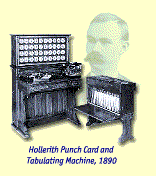 Punched card machines were developed by Herman
Hollerith late 19th century for automating the USA census.
Punched card machines were developed by Herman
Hollerith late 19th century for automating the USA census.
Hollerith won a competition (rather like a tender) for the delivery of data processing technology for the 1890 US Census. It was predicted at the time that unless new technology was implemented, that the results of the 1890 Census would not have been fully processed before the next Census in 1900.
The early cards were specific to the census. The image on the right (from the IBM history site) shows the equipment used.
Over the next 40 years, a variety of mechanical devices were developed for sorting, tabulating and performing calculations on punched-card data
Notice that Hollerith’s company eventually became IBM! After the USA Census, he went on to form a company called Hollerith Tabulating Company, which eventually was merged with two other companies into the Calculating-Tabulating-Recording company in 1914, which in turn was named International Business Machines in 1924. The logo they adapted at this time is given here at the right (from the IBM history site).
The logic for sorting which cards to extract (in a sense, the “query” for retrieving cards) was set up as an external electrical (or mechanical) circuit. This was made more flexible by using plug-boards to alter the electrical logic (a bit like a telephone switchboard where connections can be changed )
Gradually the advantages of sticking to a definite, agreed column layout for a card became apparent.
IBM eventually established their 80-column card as the industry standard.
A deck of punched cards was a form of external storage for programs or data. This was very useful in the days before magnetic disks or tapes were invented
It was not quite such a useful form of storage if you managed to drop a deck of punched cards and the order was all mixed up! People learned to number and label cards so they could re-sort them if this happened.
Why not just re-program, i.e. make a new set of cards instead of sorting the old ones? Well, it took even longer to re-program – just think of how many times you have to recompile and debug a program as you are developing it. Having to do this with punched cards was very slow because the cards had to be punched and put into the right order, and you had to book time on the computer and ask the operator to run your “job” and then come back later to get the results. Very slow!
Messages could be transmitted point-to-point over wires, using electrical impulses
Bandwidth (i.e. how many impulses per second could be transmitted) on early lines (wires) was too low to allow transmission of voice, though later in the 19th century when bandwidth improved, the invention of the telephone became possible.
Because of low bandwidth, various codes such as Morse code were used to transmit information
Punched tape made it possible to pre-record a message before transmitting on a Teletype machine
5 holes only gave 32 combinations, i.e. only 32 possible letters or numbers (characters). This is not enough even for a..z and 0..9!
The number of possible characters was extended by giving new meaning to any character that occurred after a figure shift character (very similar to the CAPS LOCK key on the usual computer keyboard)
Another character had to be assigned to change back to letter shift again.
5-hole paper tape was much used as an input medium on early computers like EDSAC
Later codes, such as the Friden Flexowriter code, used 7-hole or 8-hole paper tape. This allowed for parity checking and removed the need for the shift characters
One simple technique is to add an extra bit, making overall parity be odd (or maybe even).
e.g.:
| Message | Parity digit | Transmission | 0000 | 1 | 00001 |
| 0001 | 0 | 00010 |
| 0010 | 0 | 00100 |
| 0011 | 1 | 00111 |
| …etc… |
So if the person receiving the message added up the digits and it was an even number, they would know an error had occurred.
This simple parity checking method can detect one error. If two errors had occurred, then this method will not notice that any error has occurred at all.
This scheme cannot correct the error, because it won’t be able to tell which of the bits has been wrongly transmitted. There are many codes which allow one to correct errors as well as just detect them.
ASCII is a 7-bit code which has an optional 8th bit used for parity checking. The 8th bit was used in days when information tranmission was unreliable (it still is not perfect now but is very much better, plus there are other mechanisms for detecting transmission errors).
Some serial-line hardware (e.g. some modems) and some email software will strip off this 8th bit and discard it
This is becoming a problem now because ISO have extended the ASCII character set so that it is now an 8-bit code.
The first 128 positions are mostly printable characters. The man ascii command on Unix machines shows this:
     |  0 NUL|  1 SOH|  2 STX|  3 ETX|  4 EOT|  5 ENQ|  6 ACK|  7 BEL|
     |  8 BS |  9 HT | 10 NL | 11 VT | 12 NP | 13 CR | 14 SO | 15 SI |
     | 16 DLE| 17 DC1| 18 DC2| 19 DC3| 20 DC4| 21 NAK| 22 SYN| 23 ETB|
     | 24 CAN| 25 EM | 26 SUB| 27 ESC| 28 FS | 29 GS | 30 RS | 31 US |
     | 32 SP | 33  ! | 34  " | 35  # | 36  $ | 37  % | 38  & | 39  ' |
     | 40  ( | 41  ) | 42  * | 43  + | 44  , | 45  - | 46  . | 47  / |
     | 48  0 | 49  1 | 50  2 | 51  3 | 52  4 | 53  5 | 54  6 | 55  7 |
     | 56  8 | 57  9 | 58  : | 59  ; | 60  < | 61  = | 62  > | 63  ? |
     | 64  @ | 65  A | 66  B | 67  C | 68  D | 69  E | 70  F | 71  G |
     | 72  H | 73  I | 74  J | 75  K | 76  L | 77  M | 78  N | 79  O |
     | 80  P | 81  Q | 82  R | 83  S | 84  T | 85  U | 86  V | 87  W |
     | 88  X | 89  Y | 90  Z | 91  [ | 92  \ | 93  ] | 94  ^ | 95  _ |
     | 96  ` | 97  a | 98  b | 99  c |100  d |101  e |102  f |103  g |
     |104  h |105  i |106  j |107  k |108  l |109  m |110  n |111  o |
     |112  p |113  q |114  r |115  s |116  t |117  u |118  v |119  w |
     |120  x |121  y |122  z |123  { |124  | |125  } |126  ~ |127 DEL|
Some few of the first 128 positions are reserved for transmission information. e.g. 4 is the EOT or end-of-transmission character, and 7 BEL is the code for the beep.
The remaining 128 positions (128-255) in the ASCII set are now used for special language symbols and accented characters, e.g. ¡ (161), Ç (199), ÷ (247).
Most modern keyboards are designed to transmit ASCII codes directly to the input/output (I/O) chips of the computers. These are then relayed via the operating system to some other program of maybe are stored as data on disk.
The CTRL or control key on ASCII keyboards has the effect of stripping off the two leftmost bits (i.e. the two most significant bits). If we represent each ASCII character in octal, this corresponds to removing the first digit.
This enables the keyboard to transmit control codes.
e.g. M is 1158 but CTRL(M) is 0158,
which is the carriage return.
Similarly:
For this reason, early computers only worked with single case, usually UPPERCASE. Early programming languages like COBOL inherited this limitation so if you look at some COBOL programs it LOOKS AS IF THEY ARE SHOUTING!
Look again at the relative placements of uppercase and lowercase characters in ASCII. Their codes differ only in the middle octal digit. That is, subtract 3210 (or 408) from the lowercase character and this gives the same character in uppercase.
e.g.
	A = 1018 and a = 1418

	Z = 1328 and z = 1728
This makes conversion between uppercase and lowercase easy and fast.
So how did EBCDIC arise?
It began as Binary Coded Data (BCD)
Consider the decimal number 123. As a binary integer in 12 bits it is:
| 0 | 0 | 0 | 0 | 0 | 1 | 1 | 1 | 1 | 0 | 1 | 1 |
| 0 | 0 | 0 | 1 | 0 | 0 | 1 | 0 | 0 | 0 | 1 | 1 |
| 1 | 2 | 3 |
The BCD uses more bits but every decimal digit has its own four bits, unlike binary. Therefore, BCD is very easy to print out digit by digit.
BCD requires 4 bits to represent digits 8 and 9. The numbers 10 – 15 are not used ever. This naturally suggests using hexadecimal which utilises all possible combinations.
EBCDIC is an 8-bit code built on top of BCD. All BCD digits are represented as characters by putting 11112 (F16) in front of each four-bit BCD integer. This makes it very easy to convert integers to printable characters and vice versa.
e.g. 123 = 0001 0010 0011
is converted to a printable three-character string
11110001 11110010 11110011
Compare to plain binary, where the number must first be converted to decimal so we know what digits to write, then each decimal digit rendered as a character
e.g. 011110112 = 12310
So we need characters for “1”, “2” and “3” which are rendered as 11110001 11110010 11110011 as above.
So input and output will be much slower if we need to convert from binary number representations to ASCII or EBCDIC for output.
The EBCDIC number representation reflects IBM’s history as a commercial computer company
BCD storage of numbers (as decimal digits individually represented as binary numbers) is good for everyday commercial programming, i.e. lots of simple arithmetic performed repeatedly and with lots of input/output activity
IBM mainframes even have special instructions and hardware for performing arithmetic on BCD numbers
But… BCD arithmetic is slower that pure binary arithmetic, because carries and overflow handling are much harder. Scientific and technical work is performed much faster with binary integers and floating point real numbers
It depends on the ratio of I/O to arithmetic, the more I/O is needed, the more conversions of binary to printable characters will be needed. Binary arithmetic will be quicker and easier but the slower and more computationally intensive process to display results could wipe out this advantage.